US Green Card Photo
99.8% Acceptance Rate · Guaranteed
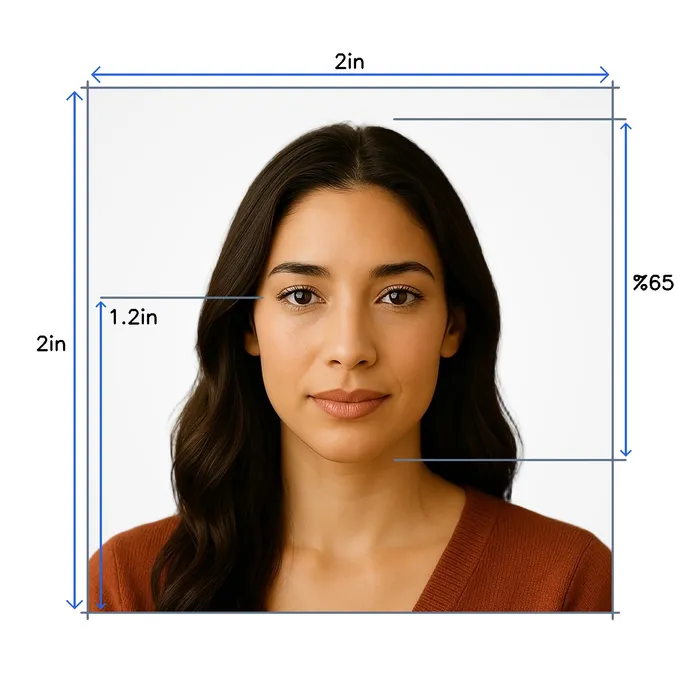
Take a selfie at home. We create a digital us green card photo with 2×2 inches, white background, and correct head size per official standards.
 Before
 After
After
Why Choose Snap2Pass
Lightning Fast
Advanced AI technology processes your photo in seconds, delivering professional results instantly.
AI Expert Review
AI-powered computer-vision algorithms verify size, lighting, background, and framing against photo standards.
Guaranteed Approval
If authorities reject your photo, we'll fix it for free or refund you - no hassle, no risk.
US Green Card Photo CheckInstant • Professional • Guaranteed
Instantly verify your photo meets US Green Card requirements. Get it right the first time.
Biometric Compliance
Face detection, eye visibility, pose alignment
Technical Quality
Resolution, lighting, focus, contrast
US Green Card Standards
Official requirements, compliance guidelines
Validated using US Green Card official requirements
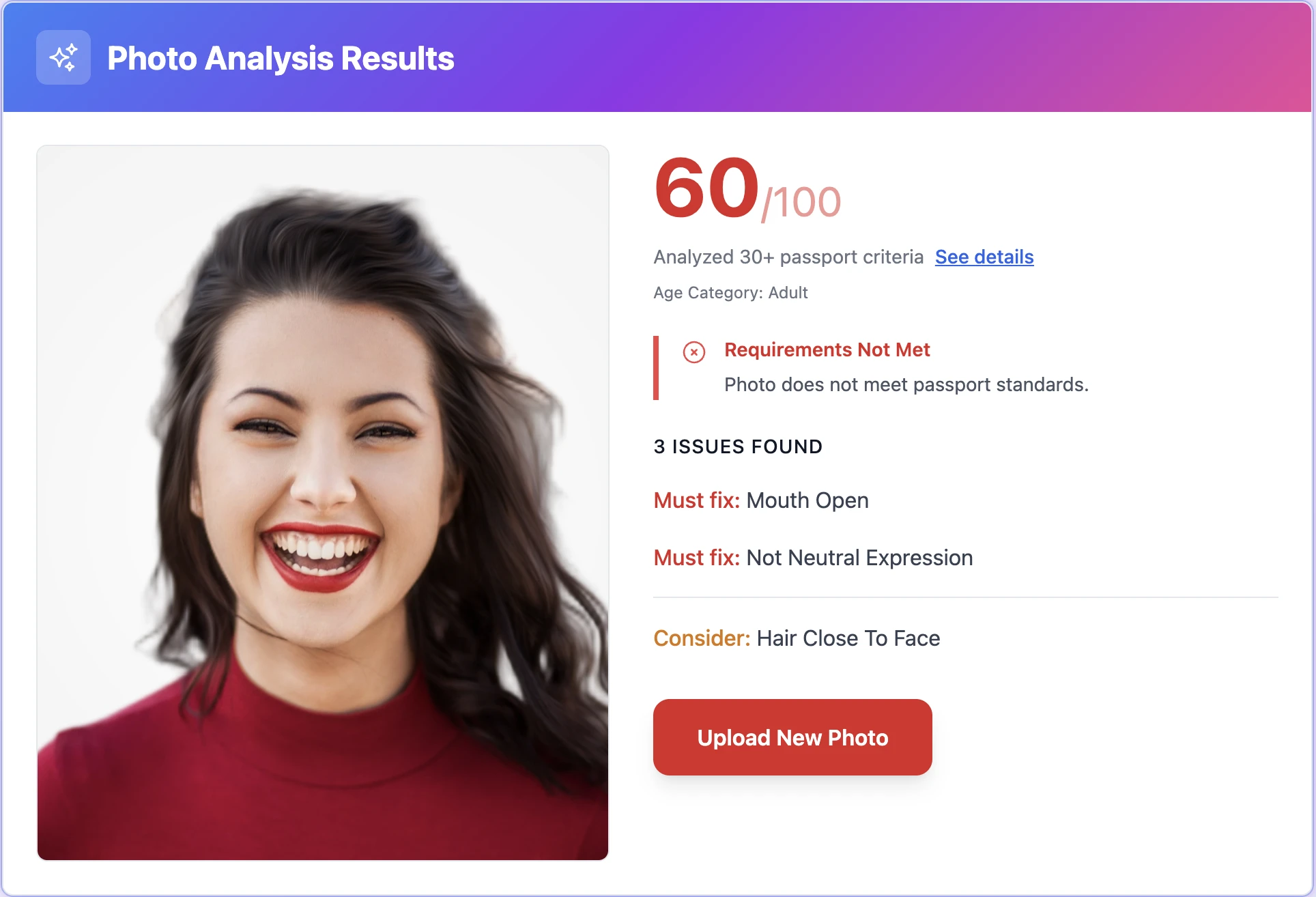
Take Perfect PhotosAt Home
Professional Results • No Technical Skills Needed
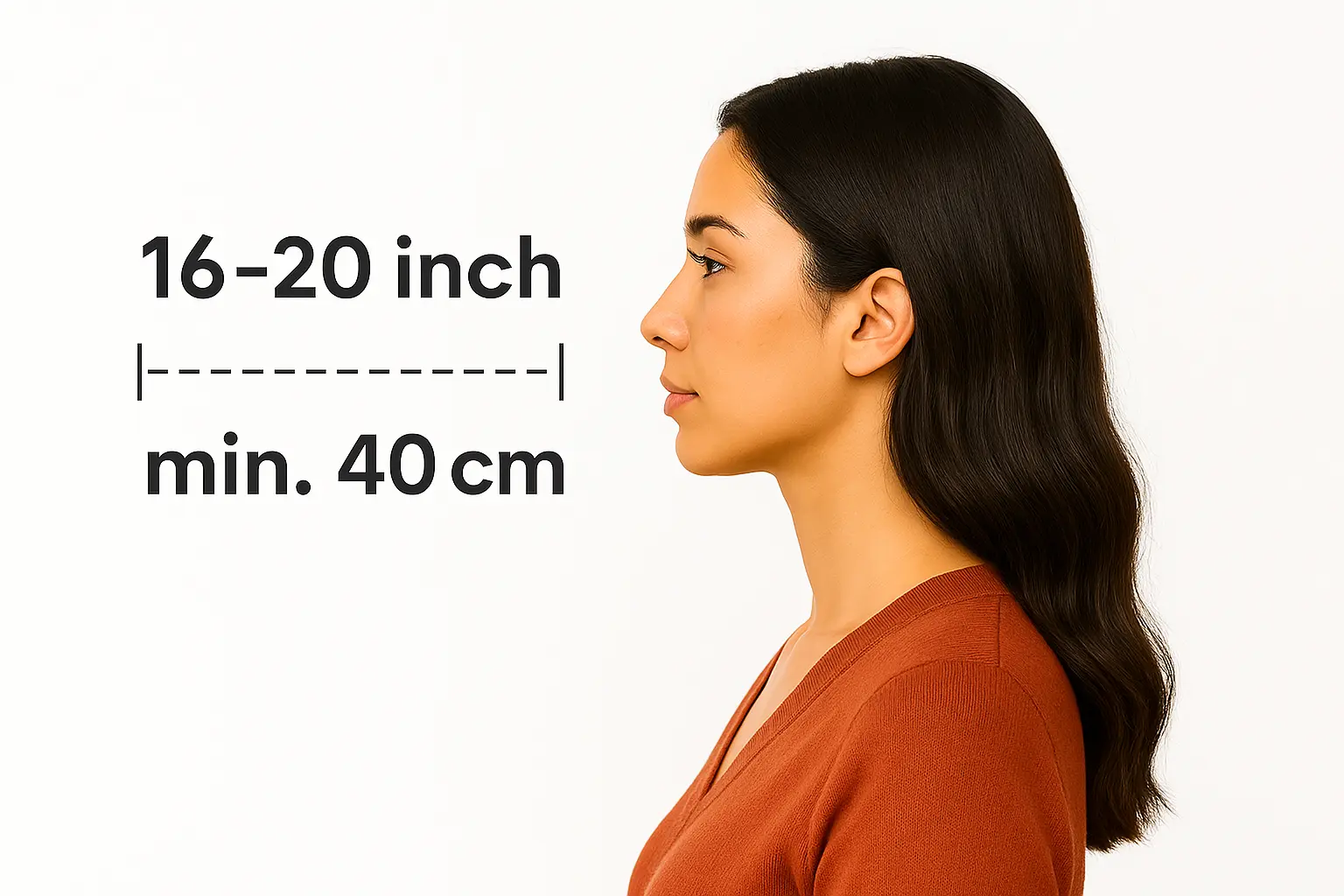
Body-camera distance
Position yourself min 16-20 inch from the camera. Ensure your head, neck, and upper shoulders are visible in the frame.
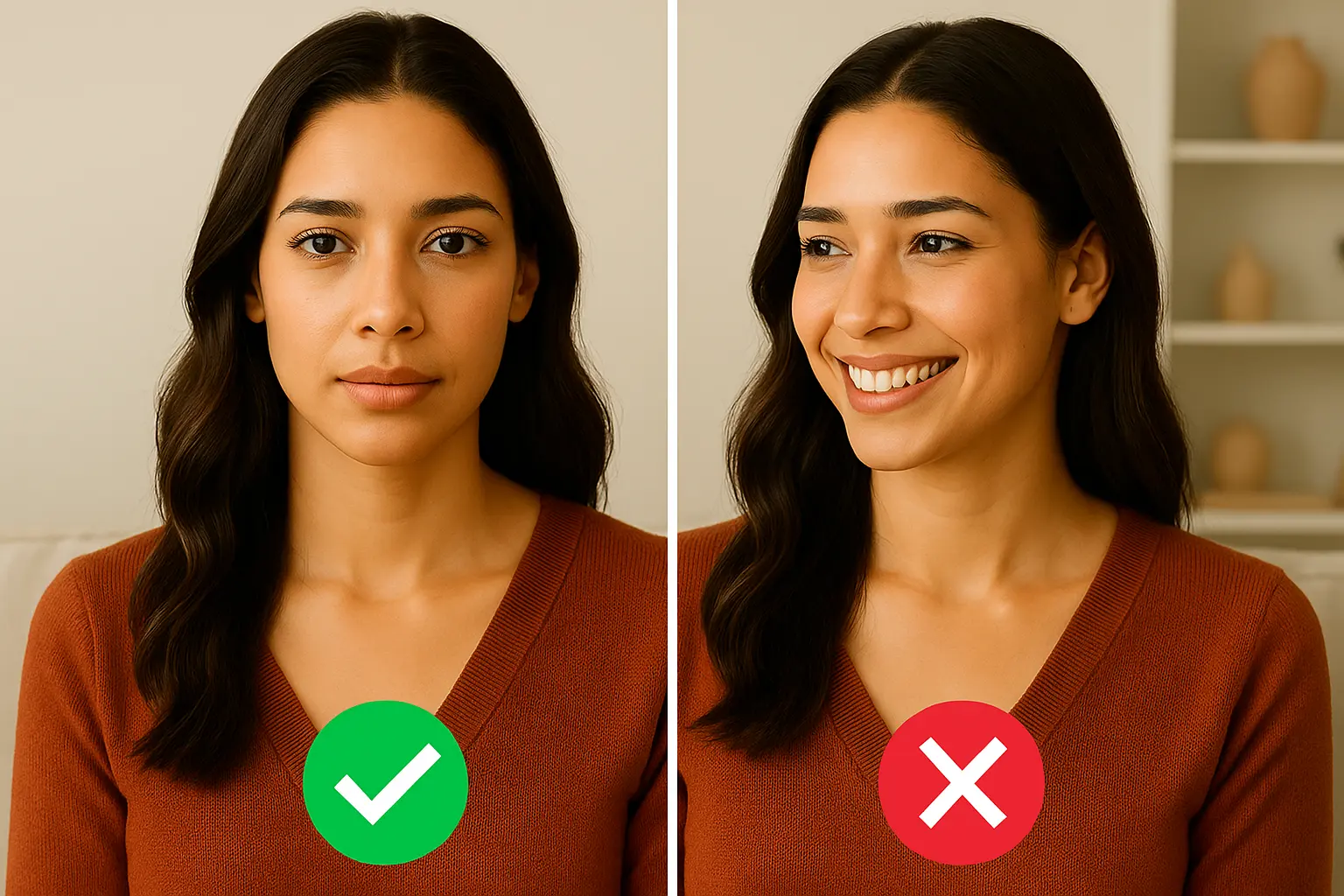
Posture: straight ahead
Keep your head straight and centered. Look directly at the camera with a neutral expression, mouth closed, and eyes open.
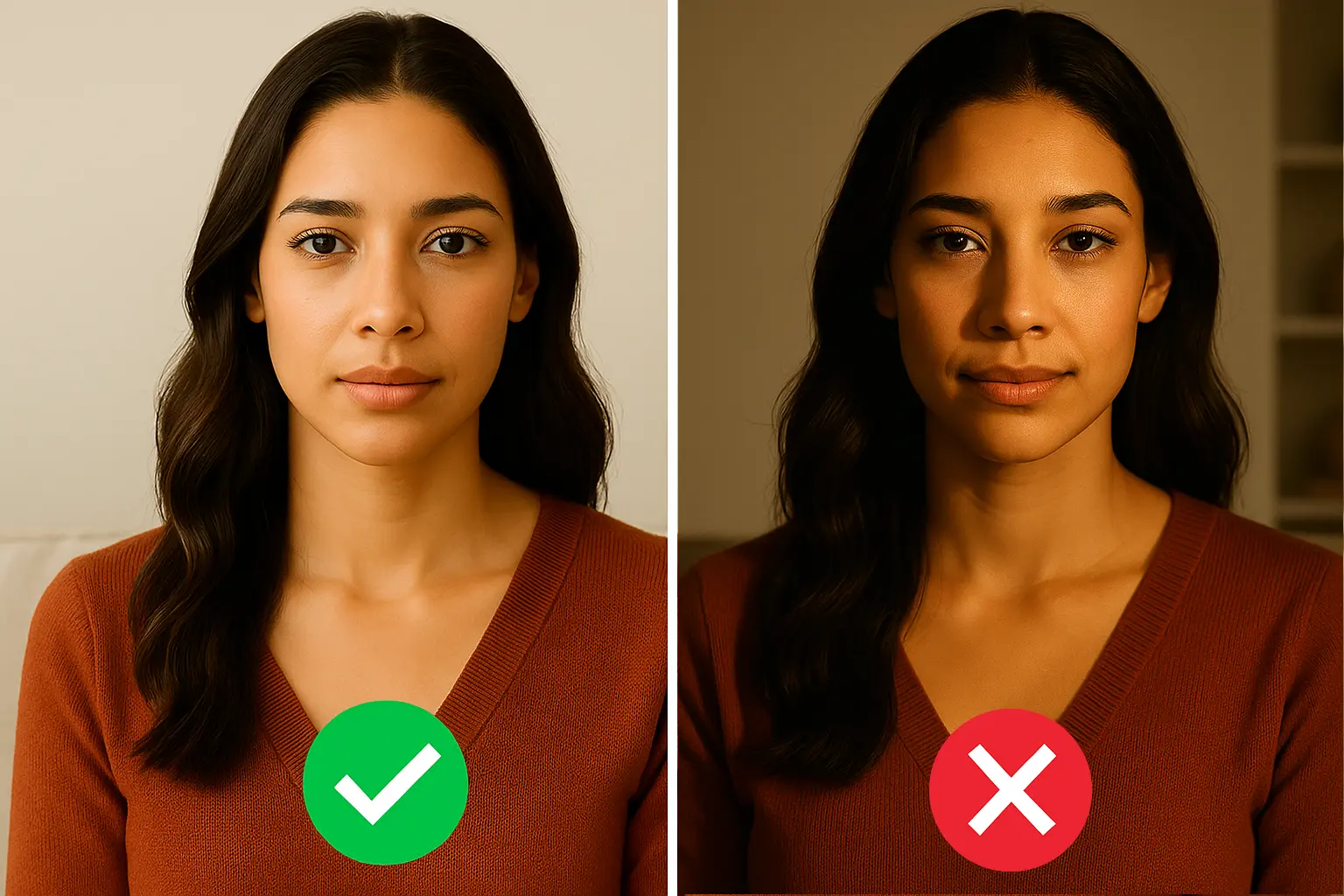
Lighting on both sides of the face
Use natural lighting for even illumination. Avoid shadows and ensure all facial features are clearly visible.
Ready in under 5 minutes • Works with any smartphone
Print Your US Green Card PhotoSame Day
Walgreens, CVS & Walmart • Under $1 for 4 Photos


How to Print Your Photo
Download your digital photo
After checkout, download the print-ready file to your phone or computer
Visit CVS, Walgreens, or Walmart photo center
Use their app or in-store kiosk to upload your photo
Print as 4x6 photo
Your file includes 4 passport-size photos on one 4x6 print
Print ready in 1 hour • No appointment needed
US Green Card SpecificationsMade Simple
Official Requirements • Compliant Standards
Size
Resolution
Position
Background Color
Not Permitted
Official Site Link
 Sandra
Important Details When Taking a US Green Card Photo
Applying for a Green Card through Form I-485 (Adjustment of Status), consular processing (DS-260), or the DV Lottery? Your photo must meet strict USCIS and State Department specifications. Photos that don't comply can trigger a Request for Evidence (RFE) and delay your case by months -- or, in the case of the DV Lottery, disqualify your entry entirely.
Important: December 2025 Policy Update
As of December 12, 2025, USCIS no longer accepts self-submitted photographs for most domestic filings, including I-485 and I-90. Your photo is now captured at a USCIS Application Support Center (ASC) during your biometrics appointment. However, you still need your own compliant photos if you are:
- Applying through consular processing (DS-260 immigrant visa)
- Entering the DV Lottery (Diversity Visa program)
- Filing from outside the United States
- Preparing for your I-485 interview (officers may request updated photos)
Green Card Photo Requirements We Comply With:
-
Size & Dimensions: Each photo must measure 2 × 2 inches (51 × 51 mm). Your head size (crown to chin) should be between 1 inch and 1⅜ inches (25–35 mm), filling 50–69% of the frame.
-
Background: Use a plain white or off-white background. No patterns, textures, shadows, or objects.
-
Recency: Photos must be taken within 30 days of filing your I-485 application. This is stricter than the 6-month rule for passports.
-
Color & Quality: Photos must be in color, printed on thin, glossy photo paper or uploaded digitally at high resolution. No visible pixels or digital enhancements.
-
Pose & Expression: Face the camera directly with a neutral expression, eyes open, mouth closed. No tilting or side profiles.
-
Glasses: As of November 2016, glasses are not permitted unless you have a signed medical statement (e.g., recent eye surgery).
-
Headgear: Head coverings are allowed only for religious or medical reasons. The full face must remain visible without shadows.
-
Attire: Wear everyday clothing. No uniforms, camouflage, or military-style attire. Avoid white tops that blend into the background.
Forms That Require Green Card Photos
| Form | Purpose | Photos Required |
|---|---|---|
| I-485 | Adjustment of Status (main Green Card application) | 2 photos |
| I-751 | Remove Conditions on Residence (2-year to 10-year card) | 2 photos |
| I-829 | EB-5 Investor Remove Conditions | 2 photos |
| I-131 | Travel Document / Advance Parole | 2 photos |
Note: Form I-90 (Green Card Renewal) and most domestic filings no longer require self-submitted photos as of December 2025. USCIS captures biometrics at your ASC appointment.
Which Green Card Path Are You On?
Your photo workflow depends on how you're applying:
| Path | Self-Submitted Photos? | Details |
|---|---|---|
| I-485 (Adjustment of Status) | ASC appointment (domestic) | USCIS takes your photo at biometrics. Prepare photos anyway during transition period |
| DS-260 (Consular Processing) | Yes -- digital upload + 2 printed | Upload JPEG with your DS-260, bring 2 printed to interview |
| DV Lottery Entry | Yes -- digital upload | JPEG, 600-1200px square, under 240KB. Each family member needs a separate photo |
| DV Lottery Interview | Yes -- 2 printed | 2 x 2 inches on photo paper |
| I-90 (Renewal) | ASC appointment | No self-submitted photos required |
Digital vs. Printed Submission
-
E-filing (Online): Upload a JPEG image, minimum 600 × 600 pixels, maximum file size 240KB, sRGB color space. We provide a ready-to-upload digital file.
-
Paper filing: Attach two identical printed photos in a small envelope or plastic bag. Lightly write your full name and A-Number in pencil on the back. Never staple through the image.
-
DV Lottery: Digital only for entry (JPEG, 600-1200px square, under 240KB). Printed 2x2" for interview.
Common Mistakes That Cause RFEs
- Photos older than 30 days – USCIS is strict on recency for I-485
- Wearing glasses – Automatic rejection since 2016
- Wrong head size – Head must fill 50-69% of frame
- Shadows on background – Must be evenly lit white
- Low resolution prints – Use glossy photo paper, not regular paper
- Digital alterations – Beauty filters, AI enhancement, and portrait mode are all prohibited
- Reusing old photos – DV Lottery photos must be within 6 months; I-485 within 30 days
Conclusion
A compliant Green Card photo eliminates an easy reason for delays. Whether you're filing domestically, going through consular processing, or entering the DV Lottery, our AI validates all USCIS and State Department requirements before you submit, ensuring a 99.8% acceptance rate. Get your photos right the first time and keep your immigration journey on track.
Related guides: DV Lottery Photo Requirements | I-485 Photo Requirements | USCIS Photo Requirements
Related Guides
- GuideUSCIS Photo Requirements 2026: Size, Background & Rules for Every Form9/11/2025 • 15 min read
- GuideCVS Passport Photo: Print 2x2 for $0.38 Same-Day (2026)7/14/2024 • 3 min read
- GuideWalgreens Passport Photo Cost 2026: $16.99 vs $0.39 DIY4/13/2024 • 3 min read
Common QuestionsAnswered
Everything You Need to Know
Supported DocumentsWorldwide
All Countries • Current 2025 Regulations • ICAO Compliant